Controls
PC Controls
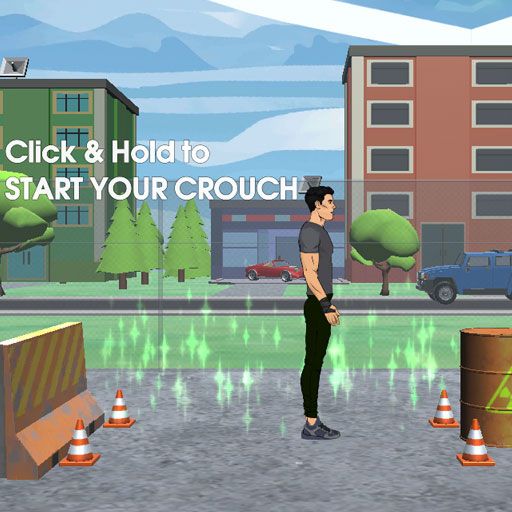
- Hold Left Mouse Button - Charge jump power and adjust launch angle
- Release Left Mouse Button - Jump
- Click Left Mouse Button (Midair) - Perform flips
- Click Left Mouse Button Again - Prepare for landing
Mobile Controls
- Tap and Hold - Charge jump
- Release - Launch
- Tap Midair - Flip
- Tap Again - Time your landing


















Wacky Flip
Wacky Flip Overview
Wacky Flip is a physics-based parkour game that challenges you to launch into the air, perform stylish flips, and stick perfect landings across urban stunt courses. Every jump is a mix of skill, timing, and ragdoll chaos as you build momentum, rotate through the air, and fight gravity before touching down inside the landing zone. The controls are easy to learn, but chaining backflips, pike twists, and aerial combos consistently takes real practice. In Wacky Flip, every attempt feels rewarding, hilarious, and worth trying again.
Core Gameplay Mechanics
Every stunt follows the same basic loop: Launch → rotate → control → land.
Build Momentum Before Every Jump
Every stunt begins with charging your jump. Holding longer changes your launch power and angle, allowing you to reach higher platforms or perform more complex aerial tricks. Finding the right amount of momentum is crucial. Too little power leaves you short of the landing zone, while too much can send you flying completely off target.
Carefully Time Your Flips in Midair
Once airborne, your focus shifts from launching to controlling rotation. Trigger flips at the right moment, keep your body rotating smoothly, and avoid spinning too early or too late. As you become more confident, you can combine multiple tricks like Backflips, Pike, Scissor, and Layout rotations to earn higher scores and impressive combo multipliers.
Stick Every Landing with Precision
Landing is where every stunt is won or lost. A clean touchdown inside the target zone rewards maximum points, while poor timing often leads to hilarious ragdoll wipeouts. Keeping your body aligned before impact helps maintain balance and finish tricks with style instead of crashing across the level.
Explore New Urban Stunt Locations
Every stage introduces fresh environments filled with creative stunt setups. Leap from rooftops, launch off water towers, dive through basketball hoops, and discover increasingly challenging parkour playgrounds.
Turn Bigger Tricks into Higher Scores
Simple flips earn points, but stylish combinations unlock much larger rewards. Linking several tricks together without losing control increases your score multiplier and encourages players to push their limits.
Controls Guide for Parkour Flips and Precision Landings
PC Controls
- Hold Left Mouse Button - Charge jump power and adjust launch angle
- Release Left Mouse Button - Jump
- Click Left Mouse Button (Midair) - Perform flips
- Click Left Mouse Button Again - Prepare for landing
Mobile Controls
- Tap and Hold - Charge jump
- Release - Launch
- Tap Midair - Flip
- Tap Again - Time your landing
Strategies for Perfect Landing
- Build enough momentum before attempting advanced aerial tricks.
- Watch your rotation speed instead of flipping continuously.
- Prioritize clean landings over risky combo attempts.
- Learn each stunt course before chasing high scores.
- Practice timing until flips become smooth and consistent.
Master gravity-defying flips, perfect every landing, and turn every rooftop into your personal stunt playground.
Play More Physics Sandbox Games
Discuss Wacky Flip