Controls
PC:
- Spacebar - Tap to the beat
- Mouse Click - Rhythm input
- Esc / Pause Button - Pause or restart
Mobile: Tap the screen - Advance the planets in rhythm




















Orbit Beats
Overview of Orbit Beats
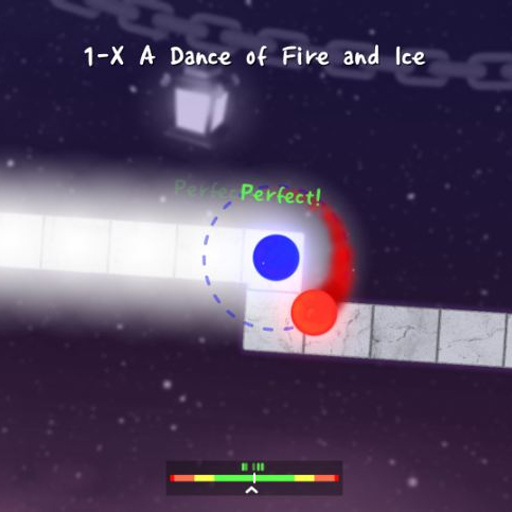
Orbit Beats is a one-button rhythm arcade game where two orbiting planets move across a musical path one beat at a time. Your only job sounds simple: tap or click at the correct moment so the pair lands safely on the next tile. In practice, every turn, zigzag, spiral, and tempo change tests how well you can synchronize visual movement with the soundtrack. A mistimed input can break the orbit and send the run back to the beginning or a checkpoint. Multiple worlds introduce new tracks, patterns, and increasingly demanding rhythms, while calibration tools help align audio and visual timing with your device.
Core Gameplay Mechanic
Tap in Sync With the Beat
Every input in Orbit Beats advances the two planets one step along the track. The planets rotate around each other continuously, so you need to press at the moment their movement matches the next tile.
Straight sections often settle into an even tapping rhythm, making the soundtrack a useful guide instead of relying only on the planets' visual position.
Change Rhythm Patterns
The track becomes more complex as levels progress. Sharp corners, zigzags, spirals, and unusual shapes change the spacing between upcoming tiles, which can alter when the next input is needed. This is where the game's one-button simplicity becomes deceptive. You never gain additional movement controls; instead, the same single input has to be timed more precisely as the path becomes harder to read.
Miss the Timing and Restart the Sequence
Orbit Beats gives immediate feedback for mistakes. An input that arrives too early or too late can knock the planets off the path and end the attempt. Later worlds increase the pressure through faster rhythms and more complicated track designs rather than by adding more buttons.
Game Controls Guide
PC:
- Spacebar - Tap to the beat
- Mouse Click - Rhythm input
- Esc / Pause Button - Pause or restart
Mobile: Tap the screen - Advance the planets in rhythm
Orbit Beats Rhythm and Timing Tips
- Listen to the music instead of watching only the planets' position.
- Keep a steady tapping rhythm on straight sections before adjusting for corners.
- Use calibration if the audio and visual timing feel slightly out of sync.
- Learn difficult patterns through repetition instead of trying to react to every tile for the first time.
- On complex paths, pay attention to changes in spacing because they often signal a change in timing.
Play Orbit Beats to prove that one button can create a surprisingly demanding challenge. Follow the music, learn the path, and keep both planets moving until the final beat.
Play More Arcade Games
Discuss Orbit Beats