Controls
- WASD - Move
- Double-tap W / Ctrl - Sprint
- Space - Jump
- Left Mouse Button - Break blocks
- Right Mouse Button - Place blocks
- 1–9 - Select an item or block from the hotbar
- Q - Drop the selected item
- Ctrl + Q - Drop a stack
- E - Open inventory
- Esc - Pause

Mine - Survival and Creative
Overview of Mine - Survival and Creative
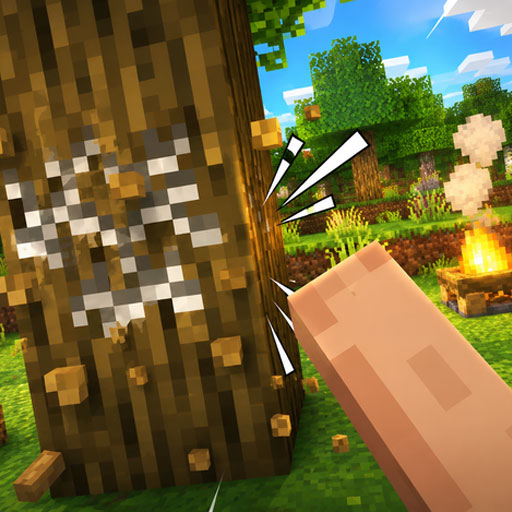
Mine - Survival and Creative is a 3D sandbox survival game inspired by the familiar block-building formula of Minecraft. You begin by creating a voxel simulation world and choosing how you want to play: Survival turns exploration into a challenge of gathering resources, crafting tools, managing health and hunger, and dealing with world dangers, while Creative removes those pressures and gives you free building tools and flight. The blocky open world is yours to mine, explore, and reshape, whether your goal is to establish a safe base or simply build whatever comes to mind. An achievement system also introduces milestones for gathering wood, crafting tools, mining better materials, and developing your world.
Core Gameplay Mechanic
The game revolves around exploration, mining, crafting, and building, but your priorities change depending on the mode you select.
Survive, Gather, and Craft
In Survival Mode, you start with very little and have to work your way up from basic resources. One of the first objectives is to find a tree and collect a log. From there, wood can be turned into planks and a crafting table, opening the way to tools such as wooden, stone, and eventually iron pickaxes.
Health, hunger, resources, and environmental dangers make preparation important. Gathering materials during exploration allows you to craft useful items and build a base that provides protection as you progress.
Build Freely in Creative Mode
Creative Mode shifts the focus entirely toward construction and experimentation. You gain access to a block palette, free building, and flight, letting you reshape the voxel landscape without having to worry about health, hunger, or collecting every building material first.
This makes Creative a better choice when you want to design houses, large structures, or experiment with different block combinations without survival pressure.
Progress Through Achievements
There are 19 achievements shown in the game, providing a loose progression path even though you are free to explore at your own pace. Early milestones include:
- Taking Inventory - Open your inventory.
- Getting Wood - Punch a tree and collect a log.
- Benchmarking - Craft a crafting table from four planks.
- Time to Mine! - Craft a wooden pickaxe.
- Getting an Upgrade - Craft a stone pickaxe.
- Isn't It Iron Pick - Craft an iron pickaxe.
- Hot Topic - Build a furnace from eight cobblestones.
These objectives are especially useful for learning the basic survival and crafting loop.
Game Controls Guide
- WASD - Move
- Double-tap W / Ctrl - Sprint
- Space - Jump
- Left Mouse Button - Break blocks
- Right Mouse Button - Place blocks
- 1–9 - Select an item or block from the hotbar
- Q - Drop the selected item
- Ctrl + Q - Drop a stack
- E - Open inventory
- Esc - Pause
Mine - Survival and Creative Tips
- Collect wood first – Logs are the starting point for basic crafting progression.
- Make tools early – Move from wooden to stone tools as resources become available.
- Build shelter in Survival – A safe base gives you somewhere to prepare for world dangers.
- Watch health and hunger – Survival Mode requires more than simply collecting blocks.
- Use Creative for big builds – Flight and free blocks make large construction projects much easier.
- Follow achievements when stuck – They provide useful clues about what to craft or collect next.
Mine - Survival and Creative gives you two very different ways to approach the same blocky world. Test your resourcefulness through mining, crafting, building, and survival, or switch to Creative Mode and turn the world into your personal construction site.
Play More Sandbox Games
Discuss Mine - Survival and Creative