Controls
- Left Mouse Button: Pick a book from a stack or place it onto a shelf
- Right Mouse Button: Return a book from a shelf to the stack
- Mouse Wheel: Zoom in or out to navigate the archive













The Grand Book Archive: Tidy Up
Grand Book Archive: Tidy Up Overview
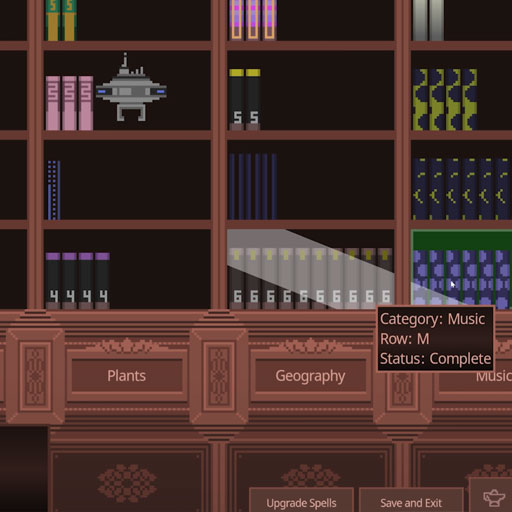
Grand Book Archive: Tidy Up is a free online 2D sorting simulation game that combines book organization with incremental progression and light management. Taking the role of an archivist, you face a collection of 2,990 archaic books that need to be returned to their rightful shelves. Each title must be sorted by its subject category and alphabetical section, turning the cleanup into a satisfying logic puzzle that tests observation and careful thinking. Completing shelves earns coins for magical spells and upgrades, while permanent progression, bots, and efficiency boosts gradually help you manage the massive archive faster.
Core Gameplay Mechanic
The main loop revolves around sorting books, completing shelves, earning coins, and improving your archive. Early on, much of the work depends on carefully reading book titles and deciding where they belong. As upgrades accumulate, the game shifts from hands-on sorting toward increasingly efficient archive management.
- Sort books into the right shelves: Inspect each title, determine its subject, and use its starting letter to find the appropriate shelf section.
- Complete shelves to earn coins: Correctly organizing books fills shelves and provides currency for further progression.
- Unlock spells and upgrades: Spend earnings on improvements that make the sorting process faster and reduce repetitive work.
- Automate the archive: Bots can work alongside you, while coin multipliers and special triggers improve efficiency and can help fill multiple shelves.
- Build permanent progression: Completing a run unlocks lasting upgrades, giving future attempts a stronger starting point.
The challenge is therefore not simply finding the right shelf. Good observation gets the archive moving, while smart upgrade choices determine how quickly the huge collection becomes manageable.
Game Controls Guide
- Left Mouse Button: Pick a book from a stack or place it onto a shelf
- Right Mouse Button: Return a book from a shelf to the stack
- Mouse Wheel: Zoom in or out to navigate the archive
Tips to Organize the Archive Faster
- Read the title before moving a book. Identify the subject first, then use its starting letter to narrow down the correct location.
- Sort systematically instead of randomly. Working through related shelves reduces unnecessary movement around the archive.
- Correct mistakes early. If a placement looks wrong, return the book to the stack rather than building more decisions around an uncertain choice.
- Invest coins in efficiency. Bots, coin multipliers, spells, and other upgrades become increasingly valuable as the workload grows.
- Think beyond one run. Permanent upgrades carry progression forward, so completing runs is important for becoming a more efficient archivist.
Play More Puzzle Games
Discuss The Grand Book Archive: Tidy Up