Controls
- Arrow Keys / Steering Wheel - Steer the truck
- Engine Button - Start or stop the engine
- Gear Shifter (P / N / D / R) - Park, neutral, drive, or reverse
- Headlight Button - Turn the headlights on or off
- Camera Button - Change the camera view
- Pause Button - Pause the game


















Truck Simulator
Overview of Truck Simulator
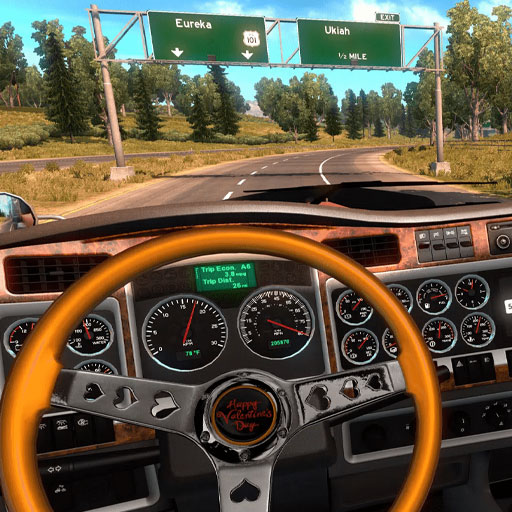
Truck Simulator is a 3D truck driving simulation game that puts you behind the wheel of a heavy vehicle and turns ordinary road driving into the main challenge. Instead of racing for the fastest time, you start the engine, shift into gear, follow the route, handle traffic, and complete driving missions with control and accuracy. Details such as a modeled truck cabin, mirrors, headlights, indicators, seatbelt, horn, and multiple camera views make the experience closer to operating a real truck than an arcade racer. With a much larger vehicle to control, smooth steering and early braking matter whenever roads become crowded or turns get tight.
Core Gameplay Mechanic
Truck Simulator is primarily about controlling a heavy truck carefully while following routes and completing driving tasks.
Handle the Truck Like a Heavy Vehicle
Before driving, you need to start the truck and select the appropriate gear. Once on the road, the challenge comes from controlling a vehicle that requires more space than an ordinary car. Turns need to be planned earlier, while braking and steering smoothly help keep the truck under control.
The game also includes functional driving details such as headlights, indicators, horn, seatbelt, and camera controls, adding more interaction to each trip than simply holding the accelerator.
Follow Routes and Complete Driving Missions
Routes take you through roads where traffic and surrounding vehicles make positioning important. Following the intended direction while avoiding collisions becomes part of completing each driving mission successfully.
The cabin view can make the experience more immersive, while changing the camera gives you a better look around the truck when visibility becomes difficult.
Game Controls Guide
- Arrow Keys / Steering Wheel - Steer the truck
- Engine Button - Start or stop the engine
- Gear Shifter (P / N / D / R) - Park, neutral, drive, or reverse
- Headlight Button - Turn the headlights on or off
- Camera Button - Change the camera view
- Pause Button - Pause the game
Truck Simulator Driving Tips
- Brake early - Heavy trucks need more room to slow down.
- Take wide turns - Give the truck enough space around corners.
- Watch the mirrors - Check surrounding traffic before changing position.
- Use the right camera - Switch views when you need better visibility.
- Avoid rushing - Clean, controlled driving matters more than maximum speed.
Start the engine, shift into drive, and take the wheel in Truck Simulator to prove you can handle a heavy truck on the road.
Play More Driving Games
Discuss Truck Simulator