Controls
PC
- Left Mouse Button + Drag: Move character icons onto empty slots.
- Mouse Click: Select characters and navigate menus.
- Reset Button: Clear the current arrangement and start again.
Mobile
- Touch and Drag: Place characters on the stage.
- Tap: Navigate menus and select available options.














Sprunkybox
Create Spooky Beats with Sprunkybox Game
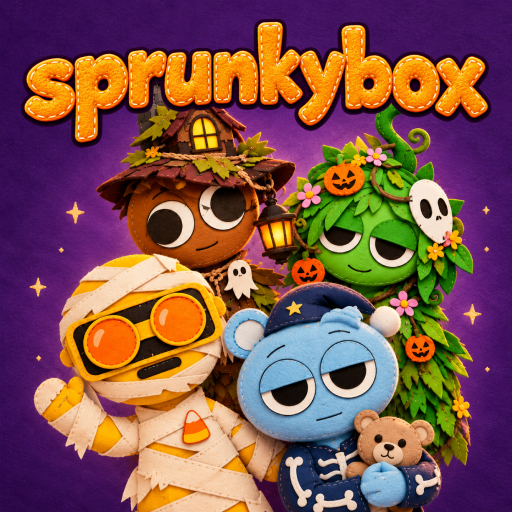
Sprunkybox is a Halloween-themed music creation game with interactive beat-mixing gameplay. Instead of playing traditional instruments, you build your own soundtrack by assigning sounds to a group of animated characters. Each character contributes a different musical element, allowing you to combine rhythms, melodies, vocals, and sound effects into one continuous performance. The game features a charming handcrafted visual style, with stitched characters, a purple night sky, glowing stars, and Halloween costumes inspired by witches, skeletons, pumpkins, and monsters. There are no scores or strict objectives, so you can focus entirely on experimenting with sounds and discovering combinations that match your musical style.
How to Create Your Halloween Soundtrack
The gameplay revolves around arranging characters and layering their sounds to create a complete musical mix.
- Choose Characters and Mix Sounds: Start with seven empty character slots. Drag a character icon from the bottom panel onto an available slot to activate its sound. Each character adds a different audio loop, and the sounds play together to form your composition.
- Customize Your Musical Lineup: The character collection includes colorful monsters and spooky costumes, such as devil-inspired creatures, skeleton witches, mummies, and Frankenstein-like characters. You can replace characters, adjust your lineup, or reset the stage to start a new composition.
Controls Guide
PC
- Left Mouse Button + Drag: Move character icons onto empty slots.
- Mouse Click: Select characters and navigate menus.
- Reset Button: Clear the current arrangement and start again.
Mobile
- Touch and Drag: Place characters on the stage.
- Tap: Navigate menus and select available options.
Go for Better Music Mixing
- Start with a rhythm: Choose a beat-focused character before adding other sounds.
- Layer sounds gradually: Add one character at a time to hear how each loop changes the mix.
- Experiment with spooky combinations: Mix monster-themed vocals, rhythms, and effects.
- Keep your arrangement balanced: Replace sounds that overpower the rest of your composition.
Sprunkybox brings a playful Halloween atmosphere to creative music mixing. Build your monster band, experiment with unusual sounds, and turn a spooky stage into your own musical performance!
Discuss Sprunkybox