Controls
- Enter / Left Click: Advance dialogue and select options
- Space: Advance dialogue without selecting choices
- Arrow Keys: Navigate the interface
- Esc: Open the game menu
- Ctrl: Hold to skip dialogue
- Tab: Toggle dialogue skipping
- Page Up: Return to earlier dialogue
- Page Down: Move forward through dialogue history
- H: Hide the interface












Save Me a Slice!
Overview of Save Me a Slice!
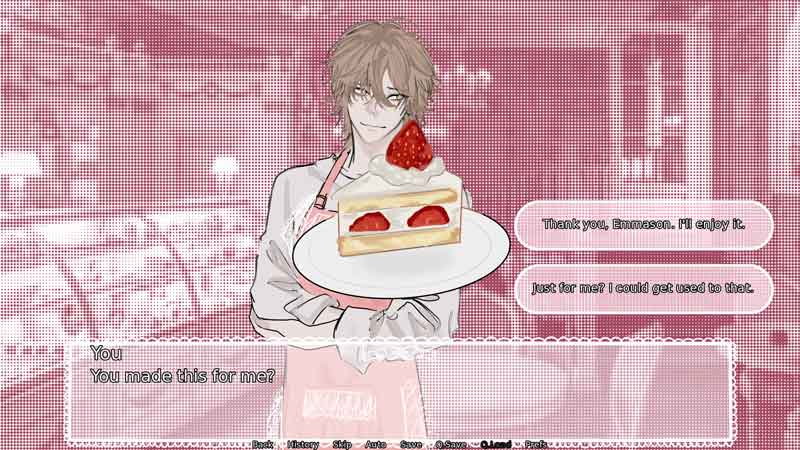
Save Me a Slice is a story-driven visual casual game set around everyday life inside a bakery. You follow conversations, meet the people around you, and choose how your character responds at key moments. Dialogue choices let you shape the tone of each interaction, from friendly and reassuring to more direct or cautious responses. With its soft pink presentation, character-focused scenes, and bakery setting, the game keeps the experience centered on reading, decision-making, and discovering how conversations develop.
Core Gameplay Mechanic
Save Me a Slice! focuses on reading dialogue and making choices. Progress through each scene, learn more about the characters, and select responses when different options appear.
- Follow the Story: Advance through conversations and narrative scenes as events unfold around the bakery. The dialogue provides the main way to learn about the situation and the characters you meet.
- Choose Your Responses: At certain moments, multiple dialogue options appear on screen. Choose how you want to respond and continue the conversation based on your decision.
- Explore Character Interactions: Much of the experience comes from talking with other characters and seeing how different personalities interact. Paying attention to each conversation helps you understand their relationships and the story around them.
Game Controls Guide
- Enter / Left Click: Advance dialogue and select options
- Space: Advance dialogue without selecting choices
- Arrow Keys: Navigate the interface
- Esc: Open the game menu
- Ctrl: Hold to skip dialogue
- Tab: Toggle dialogue skipping
- Page Up: Return to earlier dialogue
- Page Down: Move forward through dialogue history
- H: Hide the interface
Tips for Playing Save Me a Slice!
- Read Carefully: Dialogue provides important story context.
- Consider Your Choices: Think about how you want to respond.
- Check Previous Dialogue: Roll back if you missed an important line.
- Save Before Choices: Keep a save point before major decisions.
- Try Other Responses: Replay scenes to explore different conversations.
Step behind the bakery counter and see where each conversation leads. Play Save Me a Slice!, make your choices, meet its characters, and uncover the story one scene at a time.
Play More Interactive Games
Discuss Save Me a Slice!